In the high-stakes world of digital marketing, the success of a campaign often hinges on a single question: “Does it fit?” Choosing the right banner ad sizes and dimensions is not just a technical requirement — it’s a strategic pillar that dictates your reach, your engagement, and ultimately, your ROI. A pixel-perfect ad that aligns with platform standards will be served more frequently, look more professional, and convert at a significantly higher rate than one that is forced into a mismatched slot.
In This Comprehensive Guide
- The Technical Foundation: Pixels, Aspect Ratios, and File Weights
- The “Big Three” Desktop Sizes: Dominating the Fold
- Mobile Optimization: Winning the Small Screen Battle
- The 2026 Ad Size Master Table: Every Dimension You Need
- File Formats: WebP, SVG, and the Death of the Flashy GIF
- Strategic Selection: How to Choose Your Creative Mix
Mastering Every Pixel: Your Guide to Web Banner Sizes
1. The Technical Foundation: Pixels, Aspect Ratios, and File Weights
Before you open a design tool, you must understand the constraints of the digital canvas. Banner dimensions are measured in pixels (px), and they are always expressed as Width x Height. However, in 2026, we also have to consider Retina displays. A 300×250 ad often needs to be designed at 600×500 to remain crisp on high-resolution screens.
File Weight: This is the silent killer of conversions. If your ad takes too long to load, the user has already scrolled past it. Most ad networks (Google Display Network, AdRoll) have a strict limit of 150KB for static files. Using tools like Envato Elements gives you access to pre-optimized templates that are built to meet these strict technical requirements without sacrificing quality.
2. The “Big Three” Desktop Sizes: Dominating the Fold
If you are on a limited budget, you should focus your energy on the three sizes that command over 80% of the available ad inventory on the web:
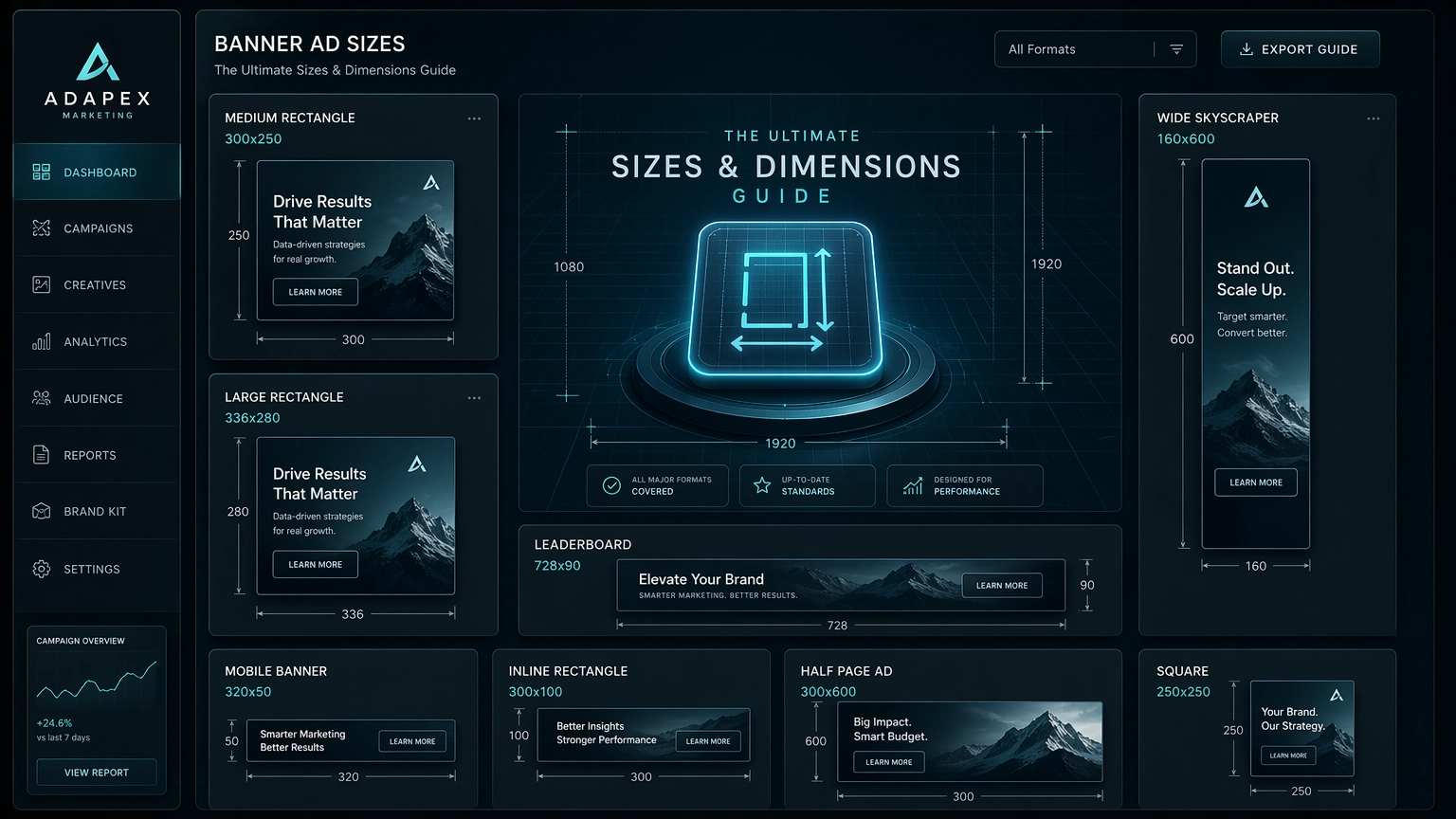
- 300×250 Medium Rectangle: The undisputed king of the internet. It works in sidebars, mid-content, and at the end of articles. For a deeper dive, read our specialty guide: The 300×250 Deep Dive.
- 728×90 Leaderboard: Usually found at the very top of a page. It’s the first thing a user sees and is excellent for brand awareness.
- 160×600 Wide Skyscraper: The vertical powerhouse. It stays in the user’s peripheral vision as they scroll, making it highly effective for retargeting campaigns.
Platforms like Adcreative.ai are game-changers here because they allow you to input one design and instantly generate all these variations with AI-backed optimization.
3. Mobile Optimization: Winning the Small Screen Battle
In 2026, mobile traffic isn’t just a segment — it’s the majority. Designing for mobile requires a “less is more” philosophy. The 320×50 Mobile Leaderboard is the standard, but the 320×100 Large Mobile Banner is often more effective because it provides 2x the visual space for your CTA.
The “Thumb Zone” Rule: On mobile, your Call to Action must be large enough to be tapped easily. Avoid placing tiny buttons in the corners where they are hard to reach. If you are struggling to visualize how these look in the real world, Foreplay.co is an incredible resource to see how top-tier brands are currently winning on mobile screens.
4. The 2026 Ad Size Master Table
Here is your quick-reference guide to every major ad size used in 2026 across the Google Display Network and other major exchanges:
| Size (px) | Name | Best Placement |
|---|---|---|
| 300 x 250 | Medium Rectangle | Content / Sidebar |
| 728 x 90 | Leaderboard | Top of Page |
| 160 x 600 | Wide Skyscraper | Sidebars |
| 320 x 50 | Mobile Leaderboard | Mobile Bottom |
| 300 x 600 | Half Page | Sidebar (High Impact) |
| 970 x 250 | Billboard | Top (Premium) |
5. File Formats: WebP, SVG, and HTML5
The days of heavy .JPGs are over. For static banners, WebP is now the gold standard, offering 30% better compression than JPEG. For logos and simple graphics, SVG is superior because it is infinitely scalable and has a tiny file size.
For animation, HTML5 has replaced GIFs. HTML5 ads are not just images; they are tiny websites that can respond to user interaction. To ensure your tracking is as advanced as your formats, we recommend using ClickMagick to monitor real-time performance and prevent click fraud.
6. Strategic Selection: How to Choose Your Creative Mix
Don’t try to be everywhere at once. If you are starting out, use the 80/20 Rule: 80% of your budget should go to the “Big Three” sizes mentioned in Section 2. Once you have a winning creative, then you can expand into the more niche sizes like the 970×250 Billboard or the 300×600 Half Page.
If you need professional help to build out a full set of banners across all these sizes, the Fiverr Marketplace is the most cost-effective way to find designers who specialize in IAB standards from $5.
Key Takeaways: Mastering Your Banner Ad Dimensions
- Focus on the “Big Three”: 300×250, 728×90, and 160×600 cover most of the web.
- Mobile is Mandatory: Always include 320×50 and 320×100 in your creative mix.
- Watch the Weight: Keep your files under 150KB to ensure fast loading and high CTR.
- Test Formats: Move toward WebP and HTML5 for better performance in 2026.
Recommended Tools for Mastering Banner Ad Sizes & Design
AdCreative.ai
Generate hundreds of high-conversion banners instantly in every size. AI scans your website to create optimized variations.
Get 10 Free Credits →Envato Elements
Unlimited downloads of premium stock photos, graphics, and templates. Fuel your creative needs for perfectly sized ads.
Get Unlimited Assets →ClickMagick
The gold standard for real-time ad tracking. Precisely measure the performance of different ad sizes and placements.
Start Tracking Free →Foreplay.co
Build your own “swipe file” of winning ads. Analyze how top brands utilize various ad sizes and formats.
Find Ad Inspiration →Fiverr Marketplace
Need a custom banner in a specific size? Access a global marketplace of freelance designers to create pixel-perfect ads from $5.
Fix Ads from $5 →Frequently Asked Questions
What are the most important banner ad sizes?
The 300×250 Medium Rectangle, 728×90 Leaderboard, and 160×600 Wide Skyscraper are consistently top performers for desktop. For mobile, the 320×50 and 320×100 are essential.
How does file size affect banner ad performance?
Larger file sizes can significantly slow down page load times, leading to higher bounce rates and lower ad visibility. Most ad networks have strict file size limits (e.g., 150KB for static images) to ensure optimal user experience.
Ready to Master Your Banner Ad Dimensions?
Navigating the world of banner ad sizes doesn’t have to be daunting. By understanding the fundamentals, prioritizing key dimensions, and leveraging modern tools, you can ensure your ads are always perfectly placed and poised for peak performance.
Legal Disclaimer: This comprehensive guide provides insights based on industry standards and best practices. Actual performance may vary due to audience specifics, market dynamics, and creative execution. WebBannerExperts.com is not responsible for decisions or outcomes resulting from these recommendations.